Audiobooks
On this page
Audiobooks have their own list, and ProkBox remembers where you are in every book separately.
Listening#
- Choose Music, then Audiobooks. (You can also add Audiobooks to the main menu in Settings › Main Menu.)
- The book you listened to most recently is at the top, so getting back to it never needs scrolling.
- Choose a book. Its page lists the chapters. Once you’ve listened to part of it, a Resume row appears at the top.
- Choose Resume to carry on where you stopped, or choose a chapter to start there.
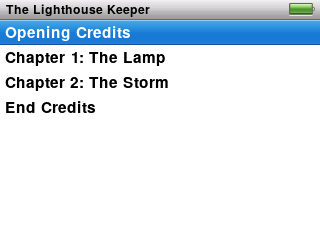
Starting a book plays only that book, not the whole list.
On Now Playing#
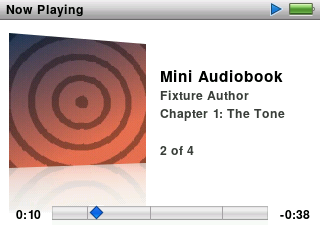
- The bar covers the whole book, with small tick marks where chapters start.
- The line under the title shows the current chapter, and a counter such as “3 of 12”.
- If a book has pictures for its chapters, you see the one for the current chapter.
- Next / Previous jump a whole chapter, not a few seconds.
- Select steps through the scrubber and the rating (no shuffle for books). Turning the wheel quickly in the scrubber snaps from chapter to chapter, which is handy for crossing a long book.
- Turn the wheel in the normal view for volume.
Resume#
Close the book, play music, switch the player off: your place in each book is kept. Open the book again and choose Resume.
Speed#
- Go to Settings › Audiobooks.
- Choose Slower, Normal or Faster.
The voice speeds up or slows down without changing pitch, so it does not sound squeaky or deep.