Settings
On this page
Choose Settings on the main menu. Turn the wheel to pick a row; the right side of the screen shows a short description or the current value.
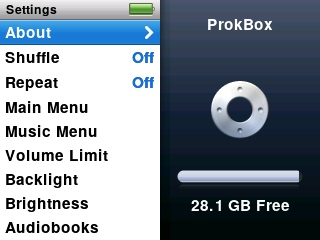
| Setting | What it does |
|---|---|
| About | Shows how full the player is, counts of songs and more, and the version. The last page has Save Diagnostics (see Troubleshooting). Use Next and Previous to change pages. |
| Shuffle | Off, Songs or Albums. Press Select to change. |
| Repeat | Choose how repeat works. Press Select to change. |
| Main Menu | Choose which items appear on the main menu, such as Audiobooks. |
| Music Menu | The same for the Music menu. |
| Volume Limit | Set a top volume so it can’t go too loud. |
| Backlight | How long the screen stays lit: Off, 2, 5, 10, 20 or 30 seconds, or Always On. |
| Brightness | Turn the wheel to make the screen brighter or dimmer. |
| Audiobooks | Playback speed: Slower, Normal or Faster. |
| EQ | Choose a sound preset. |
| Sound Check | Evens out loudness between songs. |
| Clicker | The small tick you feel and hear as you scroll. On or Off. |
| Date & Time | Set the clock. |
| Sort By | How lists such as artists and albums are ordered. |
| Language | Choose the language. |
| Legal | Reads the licence notice again. |
| Reset Settings | Puts every setting back to how it started. Your music is not touched. |
Video options are under Videos › Settings (see Video).
The screen when idle#
When the backlight turns off, the screen switches to a plain black-and-white clock you can read in daylight, with a battery symbol and a play or pause mark. Press any button to wake it. After about a minute of that, the screen goes fully dark to save power.
Sliding the Hold switch on locks the buttons.