ProkBox5g 0.7.0-alpha
27 October 2026
On this page
This is an alpha: an early look at ProkBox5g, free firmware for the iPod Video (5th generation and 5.5), for people who are happy to try unfinished software. It runs well on the unit we have tested, but expect rough edges. The first full pre-release, 0.8.0, follows.
Warning
Back up first. Copy any music or files you don’t have anywhere else off the iPod before you install.
Quick start#
- Back up anything on the iPod that you don’t have elsewhere.
- Pick the right zip (see Which file do I need? below). In one line: 30 GB models originally had 32 MB (take 32MB), 60 and 80 GB models have 64 MB (take 64MB); an original hard drive takes hdd; an untouched iPod takes stock. If the drive was replaced, go by the model it was sold as (the model number on the back).
- Install the start-up program with the free
ipodpatchertool: first save Apple’s start-up files withipodpatcher -r ProkBox-backup.bin(keep that file safe), then runipodpatcher -a bootloader-ipodvideo.ipodwith the file from the zip. - Unzip onto the iPod’s drive: copy everything in the zip to the top level of the drive, including the hidden folder whose name starts with a dot (turn on “show hidden files” first).
- Eject and restart. The iPod starts into ProkBox.
- Read the first-run notice, then press Select once its short countdown ends.
- To go back to Apple’s software at any time, hold Menu while the iPod switches on.
The full, step-by-step instructions are in the guide’s Getting started chapter, and the whole user guide covers everything else.
A quick look#
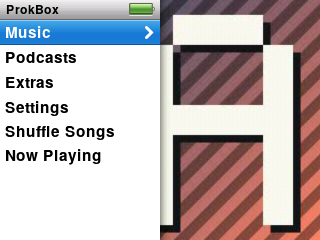
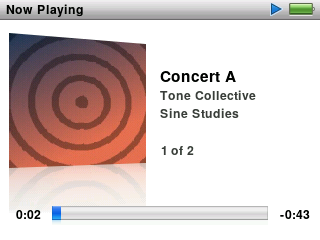

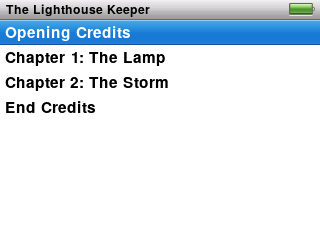
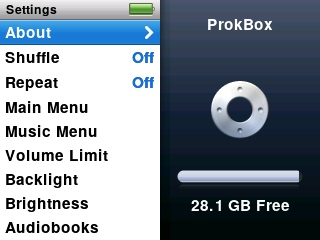
Screenshots from the simulator, with a made-up music library.
What’s in it so far#
Compared with the iPod Video’s own software:
- Menus in the style of the last classic iPods: split-screen menus with drifting album art, smooth scrolling lists, Search, the hold-Select menu and On-The-Go playlists.
- Now Playing with cover art and its reflection, ratings, and a Select button that steps through the scrubber, rating, shuffle, lyrics and the visualiser.
- Every format Rockbox plays: MP3, AAC, ALAC, FLAC, Ogg Vorbis, Opus, WAV and many more.
- Audiobooks done properly: chapters (m4b, MP3 and cue files), a separate resume point for every book, slower or faster playback without the voice changing pitch, chapter pictures, and the book you’re listening to kept at the top of the list.
- Podcasts with the classic unplayed dot.
- Drag and drop over USB: copy music on and off with your computer’s file manager. No sync app; the library updates by itself after you eject.
- A visualiser on Now Playing, drawn by the iPod’s video chip.
- Video playback is built in but switched off in this alpha; it arrives in 0.8.0.
- Sound: EQ presets, run on the iPod’s own audio chip wherever it can match them, plus Volume Limit and smooth fades.
- Extras: clocks, alarms, sleep timer, stopwatch, screen lock, notes, contacts, calendars and games, including Chess.
- Battery care: playback with the screen off runs on one processor core, and the iPod checks the battery before it starts up.
- Save Diagnostics (Settings › About) writes a report you can attach to a bug report.
- Crash-safe settings: changes are saved within a couple of seconds, and a power cut can’t leave them half written.
- Apple’s own software stays on the iPod as the way back.
Which file do I need?#
There are eight zips. The name tells you which one fits your iPod:
ProkBox5g-0.7.0-alpha- stock or modded - flash or hdd - 32MB or 64MB .zip
- stock if your iPod has its original-size battery and its 30-pin dock connector; modded for a larger (3000 mAh) battery, a USB-C port and a haptic clicker.
- hdd for the original hard drive; flash if the drive has been swapped for a memory-card adapter.
- 32MB for models sold as 30 GB (they originally had 32 MB); 64MB for models sold as 60 GB or 80 GB (64 MB). If the drive was replaced, go by the model it was sold as (the model number on the back).
If you choose the wrong one, install the right one over it; your music stays where it is. Each zip contains the ProkBox start-up program (bootloader-ipodvideo.ipod) and the ProkBox files.
Going back to Apple’s software#
Apple’s own software stays on your iPod.
- For one start: hold Menu while the iPod switches on.
- For good, keeping your music: write back the start-up backup you made when installing, with
ipodpatcher -w ProkBox-backup.bin. The Going back chapter has the details.
Known issues#
All of these were seen on a test unit:
- The visualiser froze once for about two minutes, then carried on by itself.
- Chess can crash after about 10 moves.
- Album art can take a few minutes to appear after the first start or a big music copy, while it’s built in the background.
Tested so far on a flash-modded 5.5 generation iPod with 64 MB. Hard-drive and 32 MB owners: your reports help most.
Tell us how it went#
Open a tester report or bug report, or write to prokbox.project@gmail.com. A diagnostics report (Settings › About › Save Diagnostics) helps a lot.